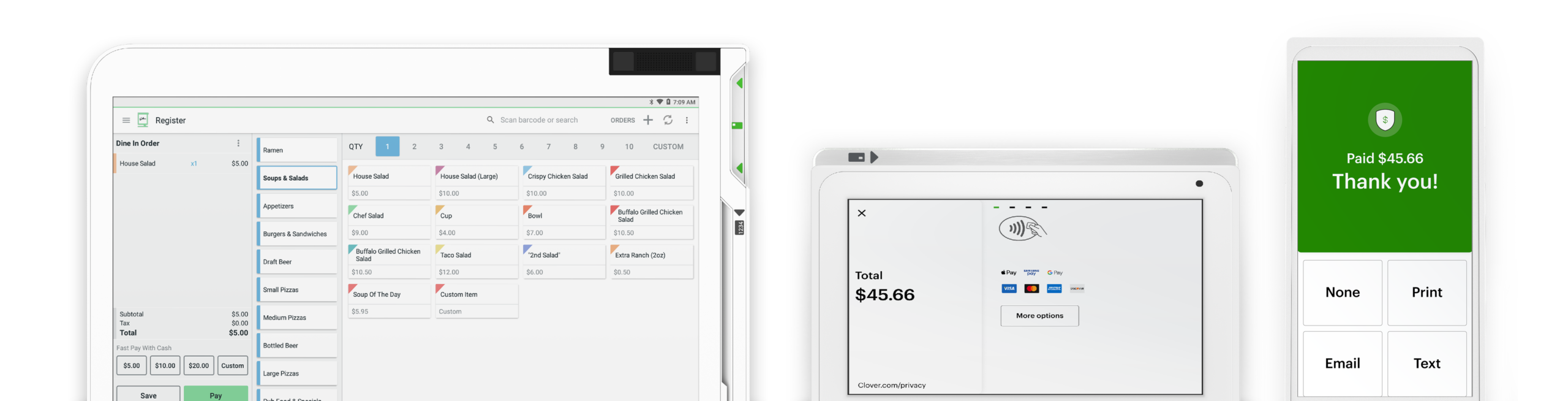






Turn Your Smartphone into a Payment Terminal

Swipetrex Mobile Payment solutions let you accept payments anytime, anywhere—using just your smartphone or tablet. Whether you’re at a pop-up shop, event, or on-site with a customer, our mobile POS ensures fast, secure, and convenient transactions without the need for heavy hardware.

Payments on the Go


Accept card and contactless payments from your mobile device anytime, anywhere.

Lightweight & Hassle-Free

No bulky hardware required—just a smartphone or tablet with our app installed.

Affordable & Flexible


A cost-effective solution designed for startups, freelancers, and small businesses.

Why You Should Choose Swipetrex Mobile Payment?

Our mobile payment solutions are designed for businesses that need speed, flexibility, and simplicity. With advanced features and secure technology, you can run your business without being tied to a traditional POS system.

Fast & Secure Transactions

Process payments instantly with full encryption and PCI compliance.

Digital Receipts

Send receipts directly to your customer’s email or phone for a paperless experience.

Integration with POS & Inventory

Sync your mobile payments with your existing POS system and inventory records.

Real-time Reporting & Analytics

Track your sales performance on the go with detailed insights.

Multi-user Access

Allow multiple team members to accept payments from their own devices.

24/7 Support & Assistance

Our support team is always ready to keep your mobile payment operations running smoothly.

Our Faq

Frequently Asked Questions

Receipt paper can be ordered directly from the “Order Paper” app, from our supplies center at +1 406-296-3240, or found at major retailers like Staples or Office Depot.

The Station printer takes 3 ⅛ inch x 230 feet thermal paper rolls.

The Mini and Flex internal printers, the Mobile printer, and the FD130 terminal take paper rolls that are 2 ¼ inches by 85 feet.

The Star SP700 Kitchen Printer (also commonly referred to as the Impact Printer) takes 76mm paper rolls, with a roll diameter of up to 85mm.

Swipetrex supports a host of compatible accessories you can view here. For assistance with adding accessories or devices to your system, contact your business consultant. You can find their contact number on your statement or by logging in to your web dashboard. On your Station and Mini, you will find the phone number at the top right corner of the screen.

Can’t find your contact number? Please call +1 406-296-3240.

The fastest way to get help is to log in to swipetrex Help to access information that's personalized for the Clover system you have. We've upgraded Help to include relevant articles based on your system, including your device(s) and the features you use.

Our agents are available to assist you when you're unable to resolve issues on your own. There are a few ways to reach live support:

From a browser, log in to your Clover account and select Help at the top to access a range of support options.

On a Clover device, tap Help on the home screen.

In the Clover Go mobile app, open the menu and tap Help.

Find your direct support phone number on your statement.

If you are staying with the previous owner’s merchant services provider, we can transfer the business’s existing Clover system to your name and set up an account.

The fastest way to get help is to log in to Clover Help to access information that's personalized for the Clover system you have. We've upgraded Help to include relevant articles based on your system, including your device(s) and the features you use.

Our agents are available to assist you when you're unable to resolve issues on your own. There are a few ways to reach live support:

From a browser, log in to your Clover account and select Help at the top to access a range of support options.
On a Clover device, tap Help on the home screen.
In the Clover Go mobile app, open the menu and tap Help.
Find your direct support phone number on your statement.

Need Help?

Need a hand? we’ve got you

New to Swipetrex?

Our swipetrex team is happy to help you with all things insurance.

Any Questions?

Mon-Fri.9-5pm

Call Now

Prefer Writing?

Send an email

Email us

Need Advice?

Talk to an expert

Contact us

Already a customer?

Make a claim, manage your insurance or ask a question.

Contact Now

Want to purchase a device with swipetrex?

It’s never been easier. Set up your Clover POS system with the right mix of devices and apps for your business. Add more devices or apps when you’re ready.